Countries, states and the world
On this page
Maps has a page for every country and territory, every U.S. state, and about two hundred thousand cities, towns and U.S. ZIP codes. Each shows the place on the map, with its outline where it has one, and gives its key facts, with links to go up a level or down to its cities.
#The World page
Select World at the end of the ribbon, or Every country on the Maps home. The page lists every country and territory under its continent. Select a continent's name for its own page, with its population, area, countries and biggest cities.
#A country
Search for a country by name, or select it on the World page.
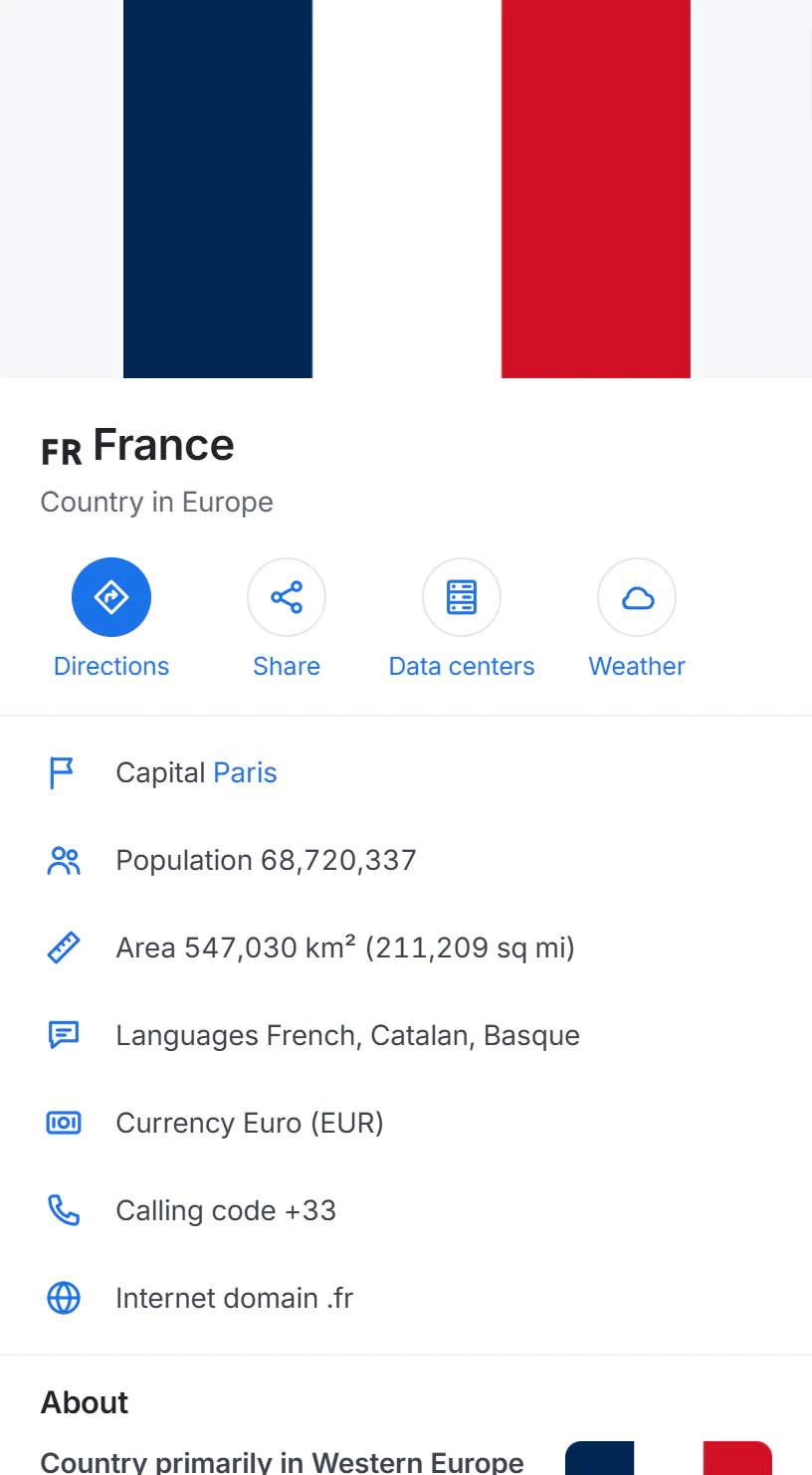
The page for France: facts first, then a Wikipedia summary, the biggest cities, the regions and the neighboring countries.
- 1The country, and which continent it is in
- 2Directions, Share, Data centers and Weather
- 3Capital, population, area, languages, currency, calling code
A country's page has:
- Buttons: Directions (to the country), Share, Data centers (the data center map for that country) and Weather, on sites that have the Weather service.
- Facts: capital, population, area in square kilometers and square miles, languages, currency, international calling code and internet domain.
- About: a summary from Wikipedia.
- Biggest cities, each linking to its page.
- Regions: the country's provinces or states; each searches the map for that region.
- Neighboring countries, with their flags.
The page for the United States lists all the states instead of regions, and each state page gives the capital, the local time in most of the state, its postal abbreviation, a Wikipedia summary and its biggest cities.
#Cities, towns and ZIP codes
Every city and town, and every U.S. ZIP code, has a page with its own facts, the weather now, nearby towns and, for U.S. cities, its ZIP codes. See Place pages.
#Moving between levels
- The breadcrumbs at the foot of each panel (World › United States › Massachusetts › Boston) take you up a level.
- The lists on each page take you down.
- The map draws each place's outline as a dashed red line, so you can see its borders.
#Common questions
Where do the country facts come from?
From GeoNames, an open geographical database, credited at the foot of each country page. The summaries come from Wikipedia.
Why does a small town have no outline?
Outlines are drawn for cities and towns with at least a thousand people, and for states and countries. Smaller places show a pin.
Why does "Directions" to a country go to one spot?
Directions need a point, so Maps uses the middle of the area on the map. For a real trip, choose a city or an address as your destination.